Case study
Case of the Rogue Server
Several hundred users lost connectivity one by one while every device reported healthy. Clearing the ARP table helped for a moment, the only real clue in the incident.
Several hundred users lost network connectivity. They went down randomly, one by one, and over a short period of time. Some users had intermittent connectivity. All of the network devices were online and functional. Users were roaming the halls and getting bored.
This called for a packet capture, but with clients offline it had to be done on a network switch. In this instance, the capture was performed at the distribution switch on the layer 3 VLAN. It revealed clients frantically trying to connect but being rejected, dropped, and ignored.
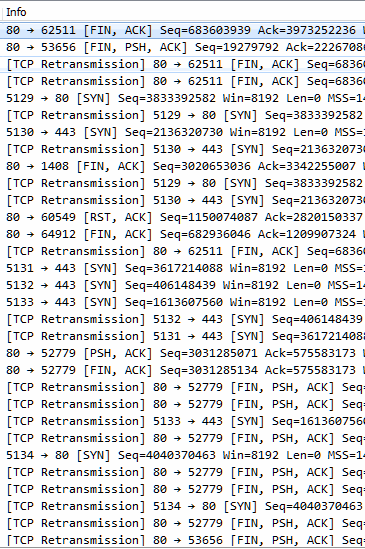
With everything down, something had to be done. The L3 VLAN was rebuilt and port security was removed. Nothing worked. An analyst at one point decided to clear the arp table. It helped momentarily, and then things fell back into disarray. That was the first real clue, though.
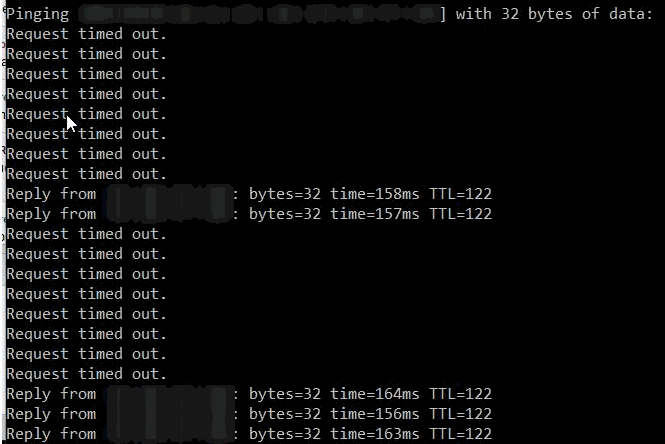
Viewing the ARP table showed the same MAC for several IPs including the client switch IPs. This MAC belonged to a device not managed by the network staff. Aha! The problem was found and the culprit was identified. We had a rogue device claiming the IP addresses of our switches and other devices.
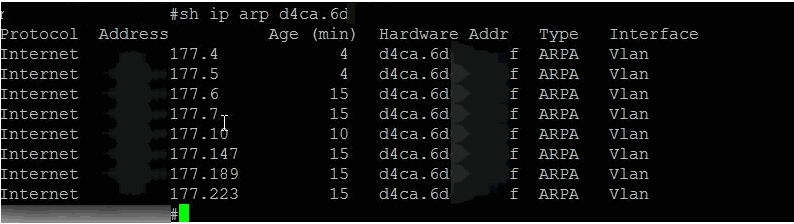
This command was then entered into the Cisco distribution switch (with x’s to protect the identity):
mac address-table static d4ca.6dxx.xxxf vlan xxx drop
The port was also disabled afterwards with a description explaining why and who to contact to have it re-enabled.
The problem immediately cleared, and network connectivity was restored. A couple of weeks later a user called describing problems with their LAN port. The situation was explained, the rogue device’s configuration was changed, and the rest is history.
Originally published in 2017 on my previous site, which is no longer online.